
4 companies compared
Four AI Tools for Coaches With Privacy Checks That Matter in 2026
The best starting point is the task, not the chatbot. Use an AI tool for preparation, knowledge retrieval, session capture or workshop materials only after deciding what data the task actually needs.

By Rohini Mundra, Founder · Updated 15 Sept 2026
The short answer
Choose ChatGPT Business for redacted preparation, Notion AI for a consented practice workspace, Otter Business for consent-led session capture and Canva Pro for non-client materials. A no-training default is useful, but it does not replace client agreement, disclosure, access controls or a decision not to upload sensitive material.
The shortlist
How we ranked them
- Publicly documented capability for a coaching workflow
- Current published price with its billing unit
- Documented data-training, retention, access or consent information
- A clear limitation that makes the product unsuitable for some coaching work
The companies in detail
ChatGPT Business
Use it to turn non-sensitive prompts into preparation frameworks and research plans.
ChatGPT Business is the strongest fit when a coach needs reusable preparation support without placing client-identifying details into the prompt. Its business data protections are useful, but retained chat history still requires a deliberate deletion and access process.
Strengths
- OpenAI says ChatGPT Business inputs and outputs are not used for model training by default.
- OpenAI says business data is encrypted at rest and in transit.
- The published price is clear for a small practice that can meet the two-seat minimum.
Limitations
- OpenAI says Business chats are saved until users delete them.
- The two-seat minimum can be unnecessary for a solo coach.
- It is not a reason to upload sensitive session notes or client records.
Notion AI
Use it to organise approved practice materials, notes and internal templates in one workspace.
Notion AI suits a coaching practice that already keeps approved materials in Notion and wants AI help finding, summarising or drafting from that workspace. It is a poor fit for casually connecting client-heavy tools without reviewing permissions and retention.
Strengths
- Notion AI can write, edit, summarise and search workspace content.
- Notion AI can transcribe and summarise meeting notes.
- Notion says customer data is not used to train its or its AI subprocessors’ models by default.
Limitations
- Notion says non-Enterprise AI providers can retain customer data for 30 days or fewer by default.
- Connected apps can expand the information available to the workspace.
- The coach still needs to control which client materials enter the workspace.
Otter Business
Use it when a transcript and recap are genuinely useful and every participant has been informed.
Otter Business is a practical choice for coaches who need cross-platform transcription and can run a disciplined consent workflow. Do not enable automatic capture for client calls unless notice, permissions and sharing settings have been checked for the relevant location.
Strengths
- Otter Notetaker can join Zoom, Google Meet and Microsoft Teams to record and transcribe meetings.
- Otter provides participant-facing recording notices and configurable sharing controls.
- Otter explicitly advises users to obtain required consent and follow applicable recording laws.
Limitations
- Recording requirements vary by jurisdiction.
- Otter’s enforced pre-meeting recording notification is an Enterprise feature.
- A transcript can contain more sensitive detail than a coach needs to retain.
Canva Pro
Use it for workshop slides, social content and visual teaching assets that do not contain client material.
Canva Pro works best for turning an approved, non-sensitive outline into teaching and marketing materials. Keep it outside the client-record workflow because Canva’s AI data language and available controls need a plan-specific review before any sensitive upload.
Strengths
- Canva Pro includes AI design tools and a published annual price for one person.
- Canva says uploaded media and design text are not used to train its AI by default unless the user opts in.
- Canva’s tools are suited to visual assets rather than storing coaching records.
Limitations
- Canva’s privacy policy says activity and content may be analysed for service improvement, with controls managed in privacy settings.
- AI-use allowances vary by plan and feature.
- It is not a session-notes or client-data system.
Apply a privacy gate before you upload
ICF’s 2025 Code of Ethics requires clear agreements about information exchange and secure handling of electronic records, including records handled through AI, while its AI standards call for documentation of data access and storage. India’s Digital Personal Data Protection Rules, 2025 use phased commencement, so privacy practice should be designed around the actual data flow rather than a plan label alone. ICF’s Code of Ethics also makes the coach responsible for confidentiality and legal obligations when technology is used.
The AI Data-Use Gate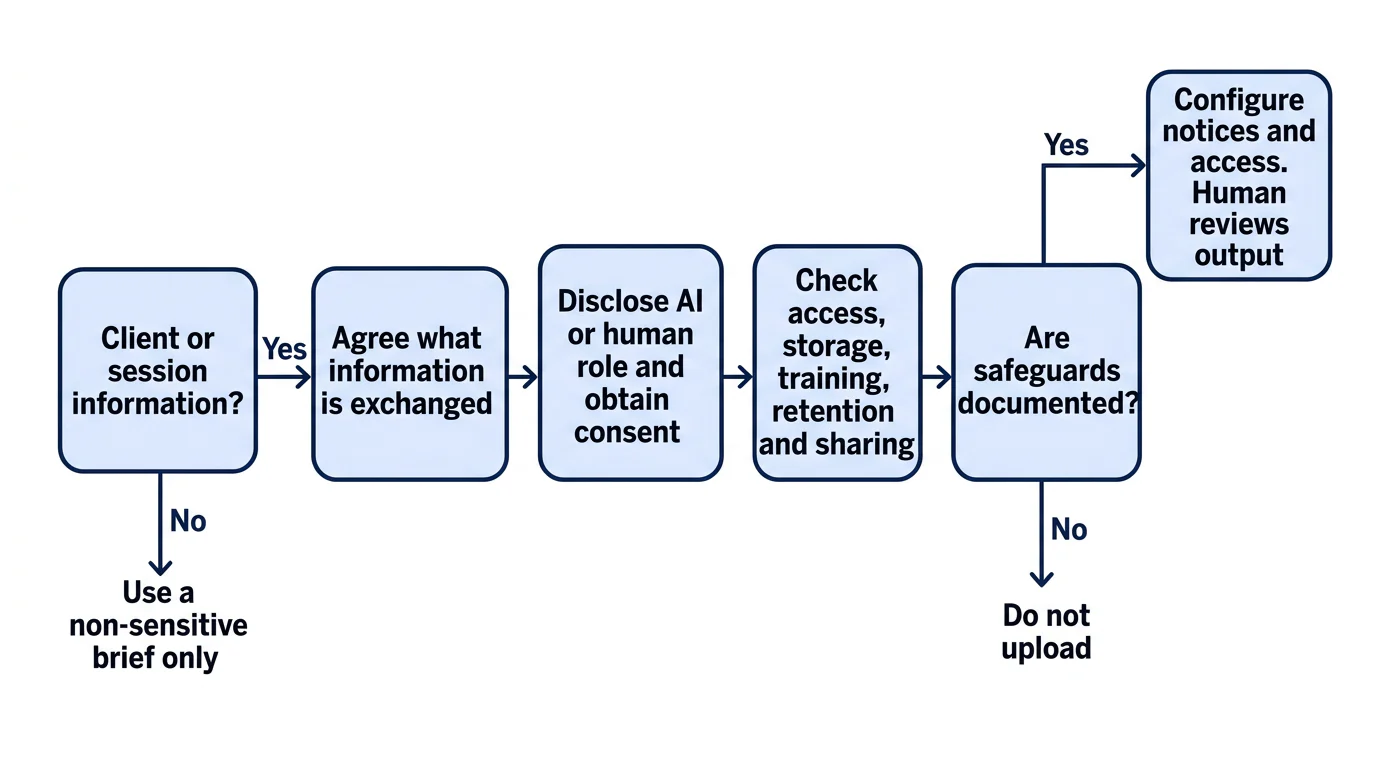
How we built this list
Prices and documentation are as of September 2026. The ranking compares published capability, price clarity and documented data practices, not review-platform ratings. No tool should be presented to a client as a substitute for a human coach: ICF says clients should understand whether they are engaging with a coach, an AI system or a hybrid service, and coaches remain responsible for confidentiality when using technology.
If you are defining the workflow around a new offer, build a coaching business from a clear first offer and narrow your coaching niche with evidence checks before automating the work around it.
This page is published by Rohini Mundra. If anything here is out of date, tell us and we will correct it.